



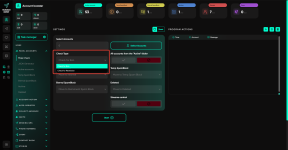
The mass check module allows you to quickly check your account for bans or restrictions. This option is available in any account folder, in the «Select actions» menu. The main difference of this module is that it performs the check in bulk, which is convenient when you have thousands of accounts, as you don't need to select them from the list. For example, during a regular ban check, you can select all accounts, but only those on the current page will be used. The mass check solves this problem.

Another point is the ability to automatically move accounts to different folders depending on the result. Let’s go over the options:
1. Select accounts — here you mark the accounts you want to check.

2. Check type — by default, the type is specified: for ban or for restriction.

3. All accounts from the «Active» folder — if you enable this option, all accounts from the active folder will be selected for checking. In this case, using manual account selection is not necessary.

4. Account movement — in the next four fields, you can specify where the accounts will be moved depending on the result. For example, if they are free from restrictions, you can set the folder to «Active»; if they have a mailing block — the «Temp mailing block» folder; if they have a permanent mailing block — the «mailing block» folder.

5. Streams control — here you specify the number of threads, which equals the number of accounts working simultaneously. For example, if you set 10 — 10 accounts will be checked in parallel. The delay controls the time the software waits before taking the next account in line. It is set as a range, and the software randomly selects a value from this range each time. In this way, the specified number of accounts will always be active, which speeds up the process.

Another point is the ability to automatically move accounts to different folders depending on the result. Let’s go over the options:
1. Select accounts — here you mark the accounts you want to check.
2. Check type — by default, the type is specified: for ban or for restriction.
3. All accounts from the «Active» folder — if you enable this option, all accounts from the active folder will be selected for checking. In this case, using manual account selection is not necessary.
4. Account movement — in the next four fields, you can specify where the accounts will be moved depending on the result. For example, if they are free from restrictions, you can set the folder to «Active»; if they have a mailing block — the «Temp mailing block» folder; if they have a permanent mailing block — the «mailing block» folder.
5. Streams control — here you specify the number of threads, which equals the number of accounts working simultaneously. For example, if you set 10 — 10 accounts will be checked in parallel. The delay controls the time the software waits before taking the next account in line. It is set as a range, and the software randomly selects a value from this range each time. In this way, the specified number of accounts will always be active, which speeds up the process.
Вложения
Важно: информация, сервисы и материалы, размещенные на форуме, предназначены исключительно для ознакомительных и информационных целей. Пользователи самостоятельно оценивают законность и допустимость их использования с учетом законодательства применимой к ним юрисдикции, а также правил соответствующих сервисов и платформ.
🔒 Единственный официальный сайт Telegram Expert — telegramexpert.pro. Лицензии продаются только на этом ресурсе. Другие сайты не являются официальными.
Последнее редактирование: